.png)


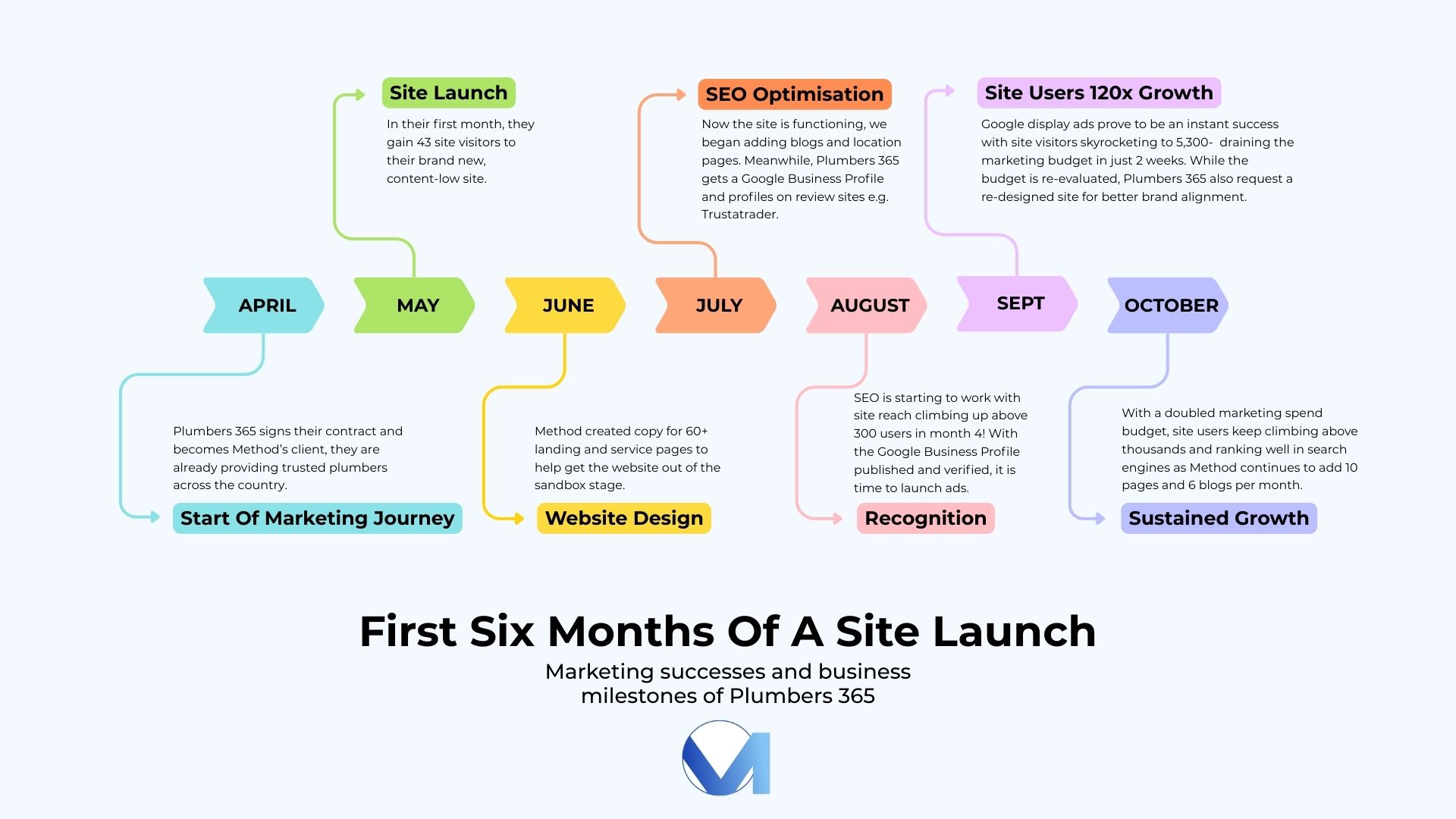
November marked 6 months of Method working with one of our principal clients: Plumbers 365. As you might have read in our previous 2 blogs, this partnership has seen great success, with Plumbers 365’s site visits surpassing that of competitors and overall new business benchmarks. By September they saw a growth of 7.5x, amounting to over 300 monthly visitors which is well above forecasts for a 4 month old site. Then, in October - their 5th month in business- they experienced a 1,641% MoM increase after our introduction of display ads boosting their active site users to 5.3 thousand, amounting to a whopping 120x increase in traffic!
Though this is a remarkable achievement, it did not come easy. In the third and final blog of our 6 month review series we will be unpacking the difficulties we had along the way: from running out of budget and having PPC ads frozen, to Google banning our ads as they did not yet trust the content. We hope that this blog helps any new business navigate their Google Business Profile set up process and any issues they may have. If you are experiencing such struggles, don’t hesitate to reach out and book a free introductory call with our team.
Step 1: Creating your Google Business Profile
Listing your business on Google so that it appears in search results and Google Maps is one of the first steps for a new business owner. The good news is that it is absolutely free and all you need is a google account and your business’ details- including a location which will be visible on Google Maps.
The details you will need to provide are often generic, for example your business’ name, category/ industry, address, contact number, and website link).
Google will then verify your account by either posting a code to your address or scheduling a live call. Once this is done, your business will be discoverable on the internet, and you will also be able to manage your business information when people do find you and start benefitting from Pay-Per-Click ads!
Step 2: Pay Per Click Ads- A New Business’ Superpower
We at Method believe Pay Per Click (PPC) ads to be one of the most convenient marketing tools for new businesses that want to get their name out there in front of potential customers. When executed correctly e.g. shown to the relevant audience with a clear CTA and demonstrating how your business can help and resolve a ‘need’ or a ‘want’, PPC ads work exactly how you’d like them to when your budget is tight. You only pay when someone clicks through to your site from your ad, rather than paying for it to be shown to anyone- relevant target audience or not. If these clicks are coming from interested future customers, your expected return on investment will be higher than for a generic ad in a newspaper or on social media. In addition, the higher the perceived relevance Google feels your ads have, the lower your cost per click is, so it pays off to focus on the quality of these ads.
Our Game Changer: Display Ads
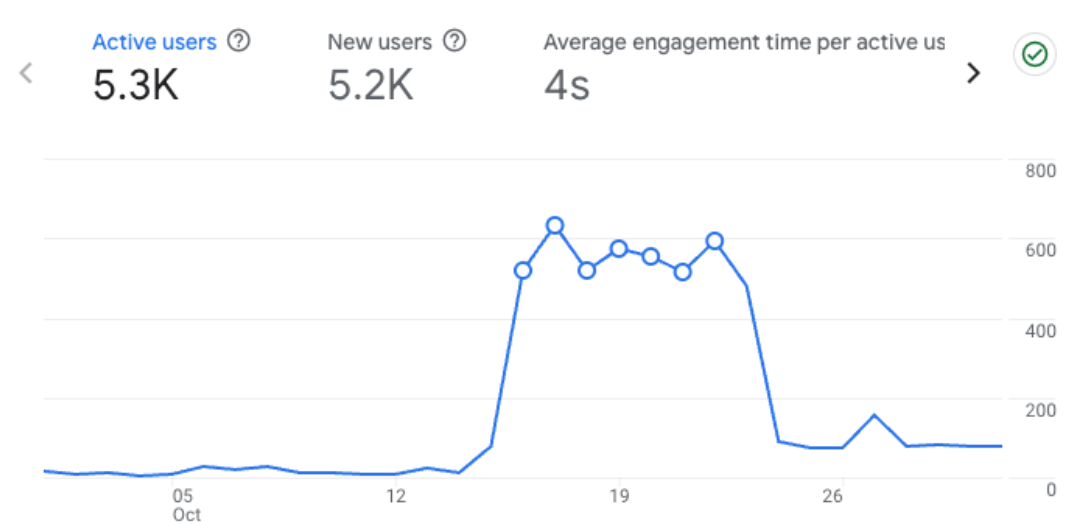
In October, we introduced display ads which skyrocketed website users and used up all of Plumbers 365’s ad budget in just a matter of days! “Display ads” increase visibility greatly by getting ads in front of a larger audience across multiple sites and apps - not just through google search. As you can see below, the website had 5.2 thousand new active users across a 10 day period. Of course, not all of these site users convert to customers, but it gets the business’ name in front of a large audience that can return in the future when they need their services.
Why did Google flag my new website and pause my PPC ads?
If your site is less than 6 months old it is likely still in a ‘Sandbox’ phase. What is the sandbox stage? The sandbox phase is almost like a probation for your website, whereby it is monitored closely by Google while they verify the content’s trustworthy-ness and make sure it is not spam before ranking it and displaying it at the top of any search engine results pages (SERPs), usually done in 2 to 6 months.
Unfortunately, PPC ads are closely linked to your Google Business profile, so if anything gets flagged up on your profile, Google has the power to pause all your ads, and it may take weeks to get them back up and running.
This is a common issue with new websites and one that Plumbers 365 also experienced, as Google doesn’t know yet whether to ‘trust’ you and the new content on your site, which is why they may suspend any business activities while they do extra verification checks. Unfortunately, while you wait for Google to complete the further verification process, your site is left trailing along at base numbers (as demonstrated in the graph below from another client, the jump after October 12th is when their ads went back online in this scenario).

Is your site or your PPC advertising not performing as expected? Schedule a call with us to see how we can help.
Why do my PPC ads stop running before the month ends?
From our experience with clients, the most common reason for PPC ads stopping is that you have reached your monthly budget. This is common when you do not track ads often enough, which is why we check our clients’ ads on a weekly basis, and conduct a monthly report to assess A/B testing results and draw conclusions of what to keep doing next month and what elements of an ad to change.
Alternatively, it could also be that your ads are performing very well in the first week and you run out of budget. This was the case for Plumbers 365 too with their strong performing display ads eating away their budget every month. In this case it would be worth it to measure how the clicks are converting to revenue and if it is cost effective to increase your PPC ad budgets to reach more potential customers.
Are you overwhelmed by all the performance data? Let us take care of it for you- enquire about our services here.